
In short
Personal trainer software should help you deliver coaching, collect money, and keep clients engaged without creating extra admin. The right choice depends on what you are building: a configurable system for an established operation, or a ready-made online service with client content, a sales page, and support already in place.
Table of contents
- What jobs should software for personal trainers do?
- Do you need one platform or a stack of tools?
- Which features matter before scheduling?
- What should you check before choosing a done-for-you platform?
- Where does Pocket Trainer fit?
- How should you compare the money side?
- Frequently asked questions
A personal trainer does not need software for the sake of having software. The point is to remove friction between a prospect finding the offer, becoming a paying client, receiving useful guidance, and staying accountable between sessions.
What jobs should software for personal trainers do?
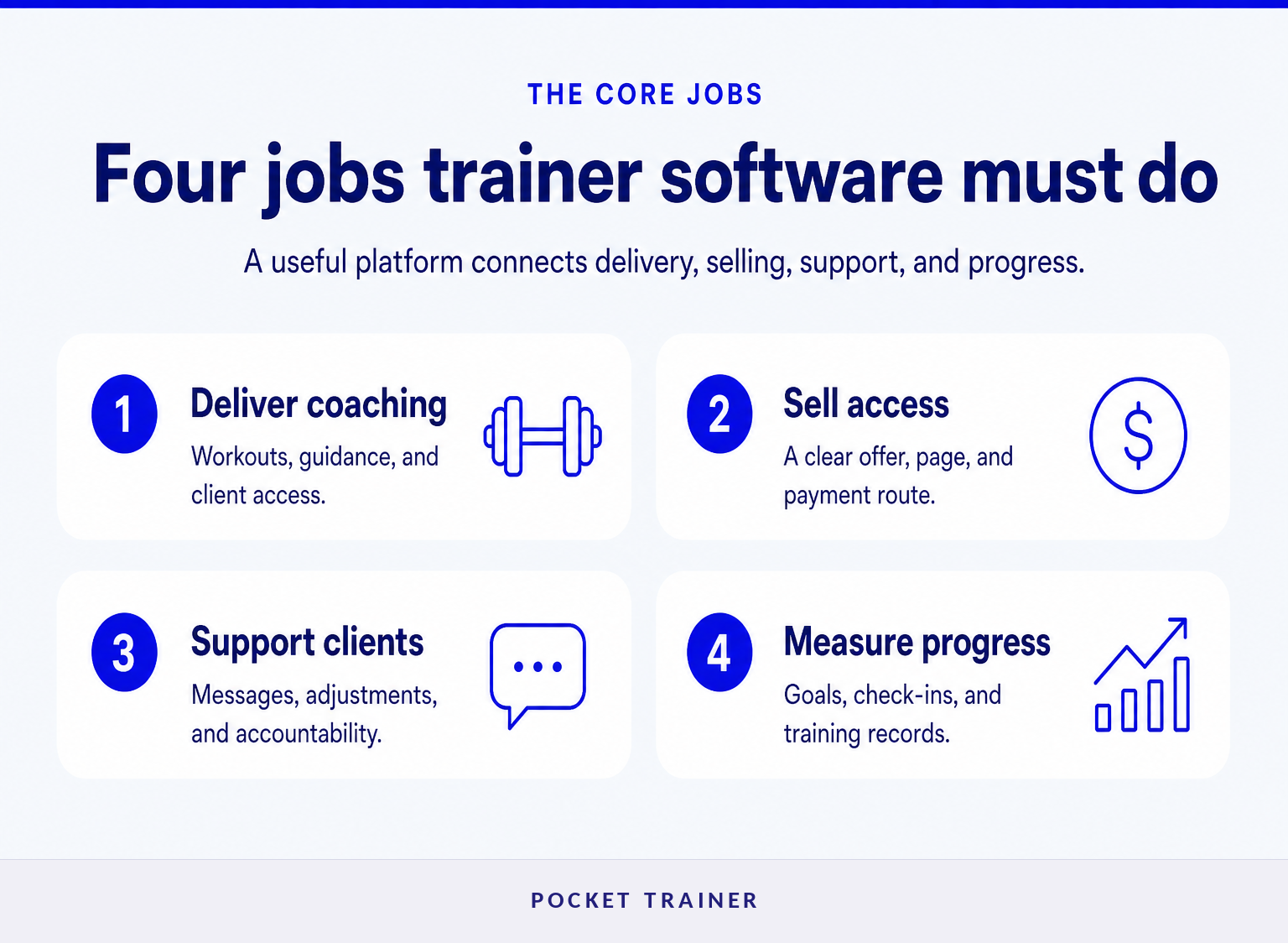
Personal trainer software should cover the client journey from delivery through payment and support. Start by deciding which parts of that journey you want to manage yourself and which parts you want the platform to help provide.
The core jobs are straightforward:
- Deliver coaching. Clients need workouts, exercise guidance, nutrition guidance where appropriate, and a place to log progress.
- Sell the service. Prospects need a clear offer, a page that explains it, and a payment route that matches how you charge.
- Support clients. Trainers need a reliable way to answer questions, adjust plans, send encouragement, and prevent clients from disappearing after week two.
- Measure progress. Goals, check-ins, training adherence, and outcome tracking make remote or hybrid coaching more useful than sending a PDF once.
Other functions can matter, especially appointment booking, contracts, intake forms, reporting, and lead pipelines. But they should come after the four jobs above. A platform that books appointments perfectly but gives clients a poor coaching experience will not fix retention.
The useful test is simple: can a prospect become a paying client and receive meaningful coaching without the trainer manually stitching together five separate systems?
Do you need one platform or a stack of tools?
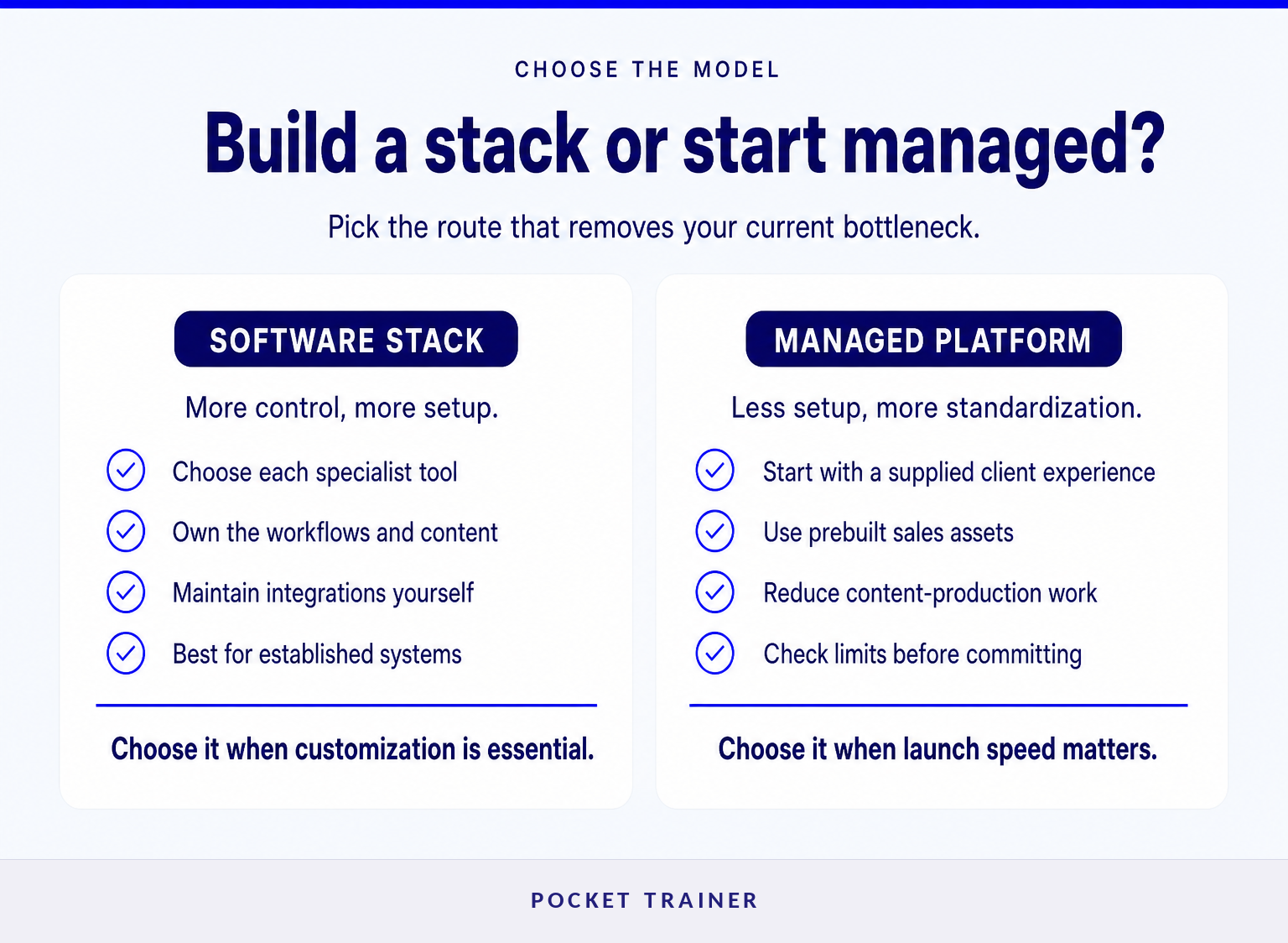
A software stack works well when you have clear processes and want control over each component. A managed platform works better when the missing work is not just software setup, but content production, sales-page creation, marketing follow-up, and client support.
A configurable software stack
This route usually means selecting separate tools for scheduling, payments, client messages, program delivery, email, and lead management. It can suit trainers who already have a website, a content library, established onboarding, and the time to keep integrations working.
The upside is control. You choose the client journey, the branding, the workflows, and the content. The cost is that you are responsible for the connections between the tools, the handoffs between sales and delivery, and the maintenance when something changes.
A managed online coaching platform
This route makes sense when the trainer wants a sellable online offer without first building the app, producing a large exercise-video library, writing a sales page, or creating follow-up automation. It is less about acquiring every possible feature and more about reducing the work required to launch.
The trade-off is standardization. A ready-made platform may provide a faster starting point, but it may not suit a business that requires a trainer-owned white-label app, fully custom workflows, or an original on-demand content catalog.
The right model is the one that removes the bottleneck in your business, not the one with the most menu options.
Which features matter before scheduling?
Before comparing scheduling calendars or invoice templates, check how the software handles delivery, conversion, communication, and ongoing client accountability. These are the functions that determine whether online coaching can become a repeatable service rather than another admin task.
Client-facing coaching experience
A client app or web experience should make the next action obvious: complete today’s workout, view exercise guidance, log progress, message the trainer, or check a goal. A confusing client experience creates more support requests and lowers adherence.
Ask to see the client side before buying. A polished coach dashboard does not guarantee that clients can use the product easily on a phone.
Workout and nutrition delivery
Some trainers need deep program-building tools and their own media library. Others need a supplied base library that they can tailor for each client. Neither approach is automatically better.
Choose original-content tools when your videos, methodology, and programming system are a central part of what clients pay for. Choose supplied content when speed to launch matters more than recording and maintaining a large library yourself.
Selling and payment collection
A client cannot buy an offer they do not understand. Look for a clear sales page, a simple checkout path, recurring-payment support if subscriptions are part of the model, and a plan for prospects who visit but do not purchase immediately.
Payment handling also needs plain-language economics. Check payment fees, revenue share, payout timing, refunds, taxes, and whether you can take payment directly if that better fits your operation.
Communication and accountability
Messaging, goal tracking, and progress monitoring are useful only if they fit the trainer’s working week. A system that encourages constant one-to-one replies may become difficult to sustain as the client roster grows.
Define your support standard before choosing software: response windows, check-in rhythm, what clients can self-serve, and what happens when a trainer is unavailable. That is how a platform protects time instead of consuming it.
Client delivery, selling, support, and accountability deserve more attention than a long checklist of isolated features.
What should you check before choosing a done-for-you platform?
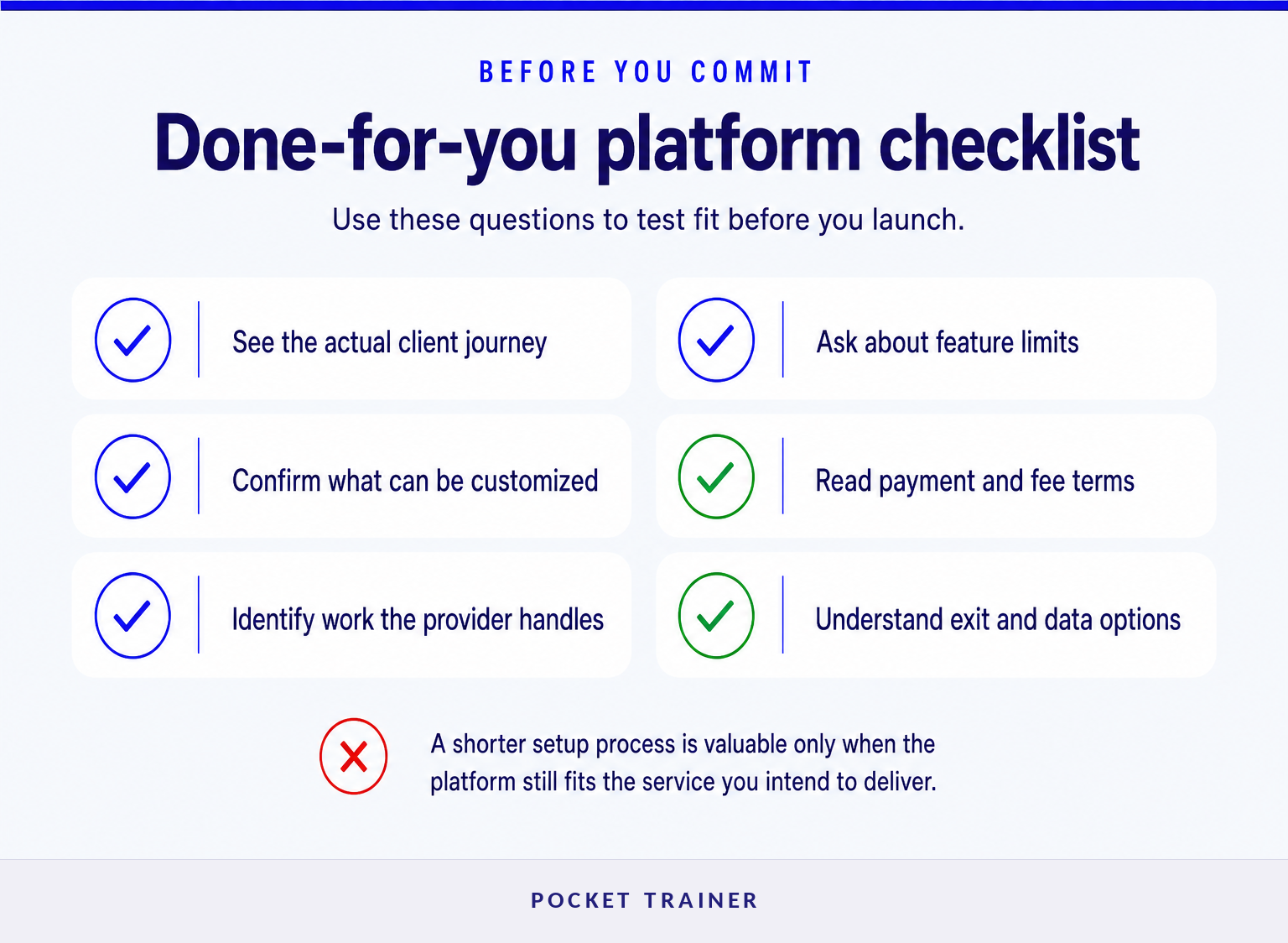
A done-for-you platform should be evaluated as a business model as well as a piece of software. Confirm exactly what is supplied, what remains your responsibility, and which customization limits matter to your service.
Use these questions during a demonstration or onboarding call:
- What does the client receive on day one? Ask for the real client journey, not only a feature list.
- What can be customized? Confirm whether workouts, nutrition guidance, communications, branding elements, and the sales page can reflect your service.
- What work is already done? Identify who creates the content, builds the sales page, processes payments, follows up with prospects, and handles routine client messages.
- Where are the limits? If your business needs live appointment booking, extensive intake automation, wearable-data connections, a full CRM, or a white-label app, verify those requirements directly.
- How does the provider get paid? A no-upfront-cost model can still involve payment fees, revenue sharing, client charges, or optional paid services.
- Can you leave cleanly? Ask what happens to client information, payment arrangements, and sales assets if you stop using the platform.
A strong buying decision comes from matching the platform’s limits to your operating model before you ask it to solve every problem.
Where does Pocket Trainer fit?
Pocket Trainer is designed for personal trainers who want to sell an online workout service without building their own app, recording a full workout library, or creating a sales funnel from scratch. Its fit is strongest for trainers who value a guided launch and supplied client content over maximum software customization.
The Pocket Trainer platform says it provides trainers with a customizable sales page, access to a client fitness app, a workout and nutrition-content library, in-app communication, goal setting, and progress monitoring. The platform also states that it supplies prospect email follow-up and social-growth support. (pocket-trainer.co)
That combination changes the buying question. Instead of asking only, “Which tool can I configure?” a trainer can ask, “Can I begin selling a credible online service without first becoming an app developer, video producer, and funnel builder?”
Pocket Trainer states that trainers may either collect client payments directly or use its checkout and recurring-billing option. Where the Pocket Trainer checkout is used, the site says the trainer keeps 90% and Pocket Trainer takes a 10% fee on the payment. (pocket-trainer.co)
Pocket Trainer is not the ideal choice if owning a fully white-labeled app or hosting an original trainer-recorded video catalog is essential to the offer. Pocket Trainer explicitly says it is not for trainers who want to record their own workout videos or create their own app and sales page. (pocket-trainer.co)
For a trainer who wants a practical starting point, the next step is to see how the Pocket Trainer platform is set up and compare the supplied service against the requirements on your own checklist.
Pocket Trainer is best assessed as a managed route to online coaching, not as a universal replacement for every specialized business system.
How should you compare the money side?
Compare the full commercial model, not just the monthly software price. A platform can be free to start yet still have payment fees, client charges, revenue sharing, or constraints that affect the service you can sell.
Pocket Trainer says trainers keep 100% of client revenue when they collect payment themselves. For payments processed through Pocket Trainer checkout, the company says the trainer keeps 90% and Pocket Trainer retains 10%. (pocket-trainer.co)
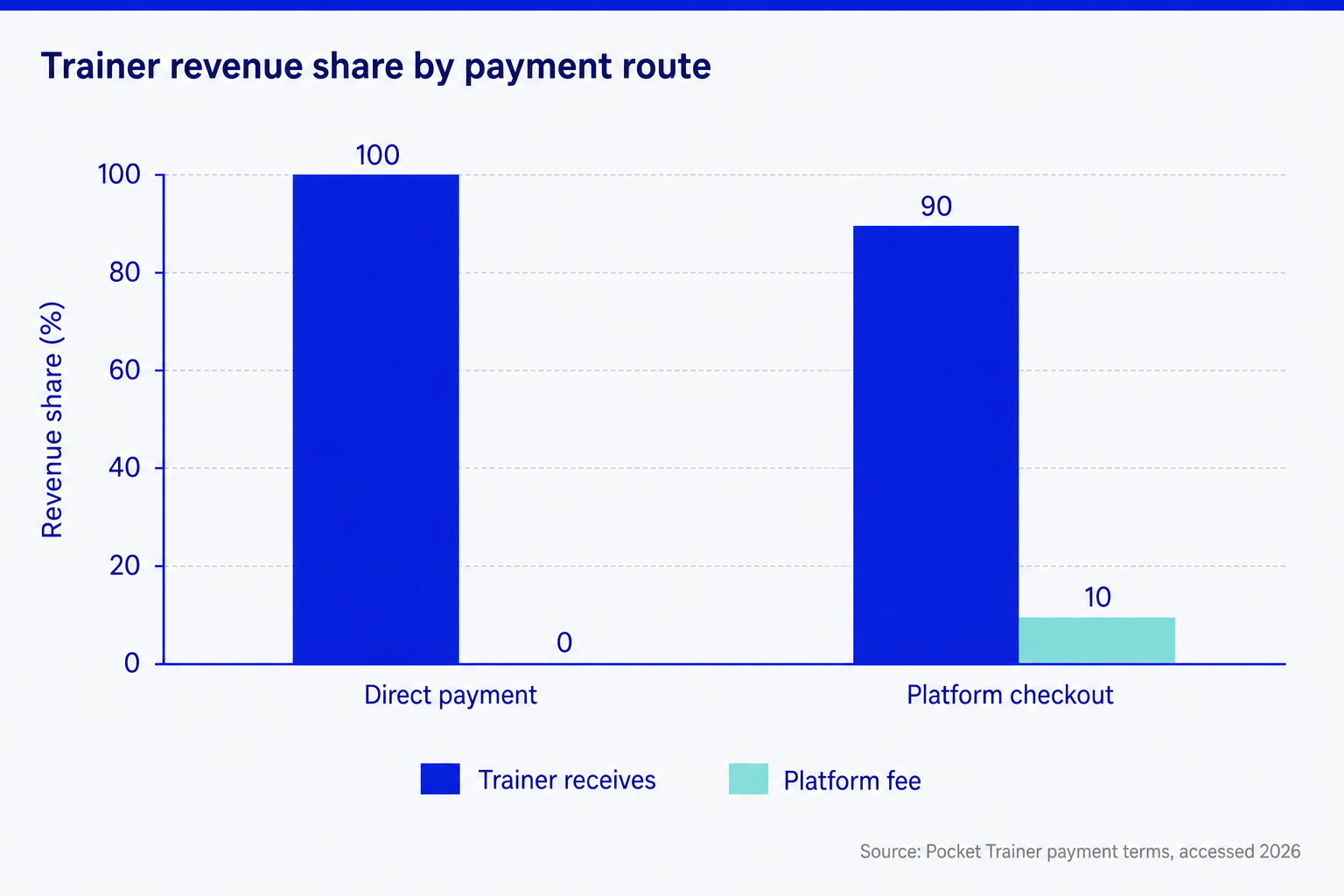
The chart does not say one option is universally cheaper. Direct collection may preserve more revenue, while a managed checkout may reduce the work involved in collecting recurring card payments. The right comparison includes time, payment administration, failed-payment handling, and the price you can realistically charge.
Treat payment terms as part of the product design: the checkout route should support the service you can deliver consistently.
Frequently asked questions
What is the best software for personal trainers?
The best software for personal trainers is the system that supports the specific service being sold. A trainer who needs appointment scheduling and custom workflows may need configurable tools, while a trainer launching online coaching quickly may benefit more from a platform that already includes client content, a sales page, payments, and follow-up support.
Do personal trainers need separate software for online clients?
Personal trainers do not always need separate software for online clients, but online delivery needs more than a calendar. Clients need a practical way to access workouts, receive guidance, communicate, and track progress between sessions. If the current system cannot support those actions simply, separate online-delivery software may be justified.
Should personal trainers use a free platform?
A free platform can be a sensible starting point when the commercial terms are clear and the service fits the trainer’s goals. Check what happens when clients pay, which fees apply, what support is included, what can be customized, and whether the platform limits essential requirements such as branding, content ownership, or reporting.
The best software decision is the one that supports a clear service, a sustainable workflow, and an honest path to revenue.
Choose the platform that removes your real bottleneck
If your main barrier is launching and selling an online coaching offer, prioritize a platform that reduces setup, content, and follow-up work. If control over every workflow is the priority, build the stack deliberately and budget for the operational work that comes with it.
Start by reviewing Pocket Trainer’s setup process if a ready-made client app, sales page, workout content, and optional checkout would help you begin serving remote or hybrid clients sooner.